Is It Safe to Paste a JWT Into an Online Decoder? (2026)
Decoding a JWT needs no key, so decoding itself is harmless. The risk is that a signed token is a live credential — and 'we process client-side' is a claim you cannot see. Here is the 20-second test that settles it.
 By David Pham, founder of Pickrack
Search for "JWT decoder" and you get thirty tools, all promising the same thing. Search for whether it is actually safe to use one, and you get thirty tools again.
So here is the direct answer.
The short version
| The question | The answer |
|---|---|
| Is decoding a JWT risky? | No. It needs no key and reveals nothing the token was hiding. |
| Is pasting a live token into a third-party site risky? | Yes. The token is a working credential until it expires. |
| Does "client-side processing" fix that? | Only if you can verify it. You can — see below. |
| Is there a way to skip the trust question? | Yes. Decode it yourself in DevTools. Takes one line. |
The distinction matters because most advice collapses these into a single scary rule and then gives you no way to act on it.
Why decoding itself is harmless
A standard signed JWT has three dot-separated parts: header, payload, signature. The first two are Base64url-encoded JSON. Encoding is not encryption. It exists to make the JSON compact and safe to put in an HTTP header, not to hide it.
Anyone who holds your token can already read every claim inside it, with no key and no tool. The signature does not conceal the payload — it only proves the payload has not been altered since the issuer signed it.
This has one blunt consequence that surprises a lot of developers: do not put anything in a JWT payload that you would not put in a URL. Not a plan tier you consider confidential, not an internal cost centre, not a partially-masked identifier you assumed nobody would look at.
The three risks that are real
1. The token is a live credential
An access token is closer to a password than to a document. Anyone holding an unexpired one can call your API as you. Pasting it into a site you do not control means that string now exists in someone else's environment — possibly in a request log, a proxy, an error tracker, or a CDN cache.
Expired and synthetic tokens carry none of this risk. That is the whole reason to keep a throwaway token around for debugging.
2. The claims leak more than the token
Look at what a realistic production payload actually contains:
{
  "sub": "usr_8812f0a4",
  "email": "[email protected]",
  "org": "org_c41",
  "org_name": "Acme Health - Cardiology",
  "roles": ["billing.admin", "phi.read"],
  "region": "eu-central-1",
  "iss": "https://auth.internal.acme.example",
  "exp": 1786800000
}
Even after that token expires and stops being useful as a credential, you have handed over a real employee's email, your internal issuer hostname, your org ID scheme, your role naming, and the fact that someone in cardiology can read PHI. In a regulated environment that is a disclosure on its own.
3. "Client-side" is a claim you cannot see
This one deserves care, because the pages that rank for this topic are full of accusations.
jwt.io — the canonical debugger, originally from Auth0 and now part of Okta — documents that decoding happens in your browser. Several competing tools assert it uploads your token instead. Those assertions appear on marketing pages for the alternatives, with no documented evidence behind them, so treat them the way you would treat any competitor claim: skeptically.
The actual problem is subtler and applies to every tool in this category, including ours. "We process client-side" is a statement about code you did not read, shipped by a deploy pipeline you cannot see, loading scripts from CDNs you did not audit. It may be entirely true today. You have no way to know it is still true after next Tuesday's release.
The answer is not to pick whichever tool shouts loudest about privacy. It is to stop taking the claim on faith.
The 20-second test
You can settle this yourself, in the browser, right now.
- Open the decoder and let it load fully. Everything it needs must already be in the page.
- Open DevTools (F12), go to the Network tab, click Clear.
- Set the throttling dropdown to Offline. The page can no longer reach any server, including its own.
- Paste a synthetic or expired token and decode.
- Read the result.
If the header and payload render while the browser is offline, the decoding happened on your machine. It could not have happened anywhere else — there was no network.
If the tool spins, errors, or silently does nothing, it needed a server round trip. Now you know.
Here is that test run against our own decoder, captured by a script rather than by hand:
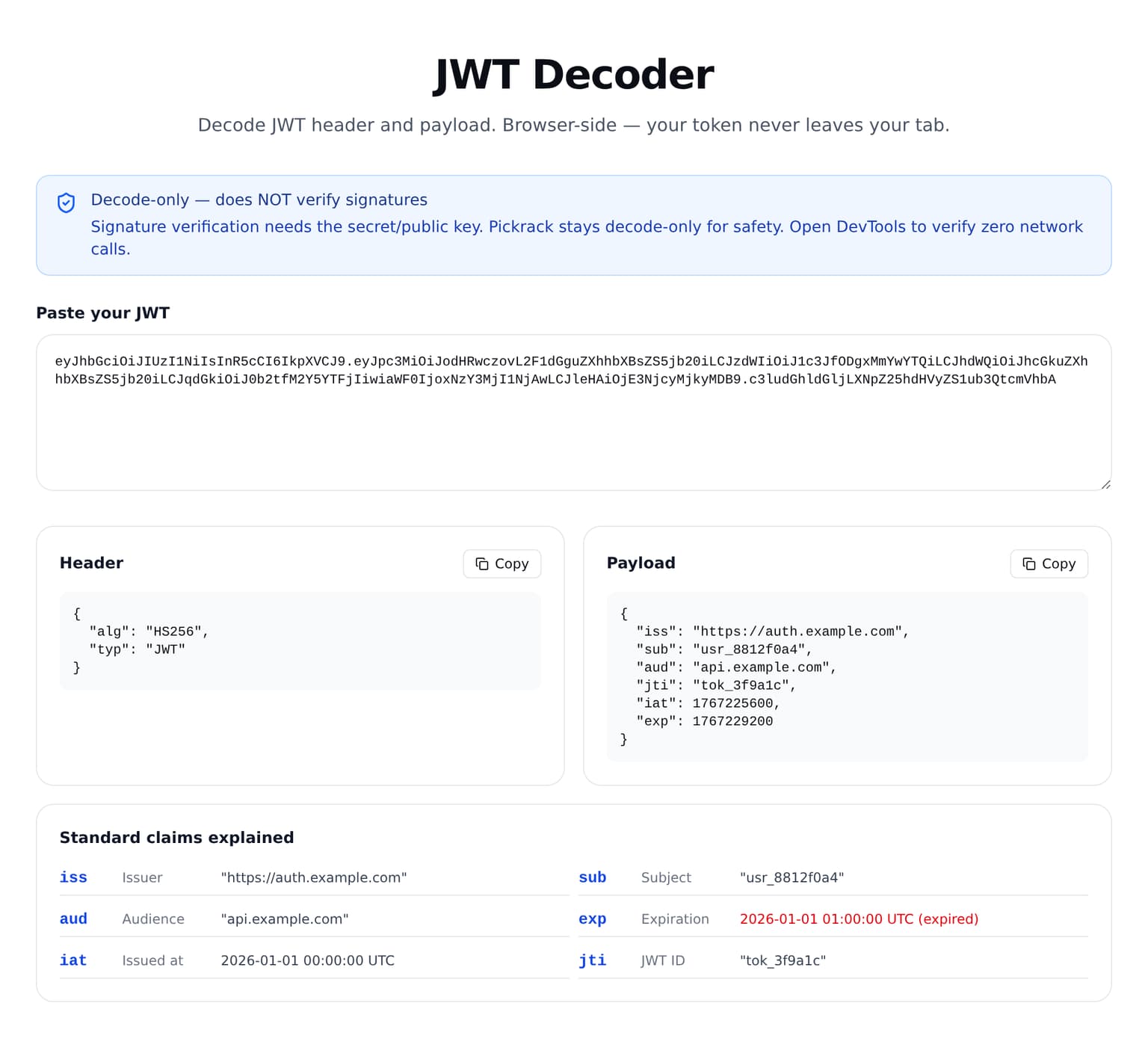
Do the same test on ours: pickrack.com/tools/dev/jwt-decoder. It decodes offline, because it never had a backend to call. We would rather you check than believe us.
One caveat, stated plainly: this test proves what today's code does. It is not a permanent guarantee for any tool, ours included.
Or skip the trust question entirely
You do not need a website for this. Open your browser console on any page and run:
const decodeJwt = (t) =>
  t.split(".").slice(0, 2).map((seg) => {
    const b64 = seg.replace(/-/g, "+").replace(/_/g, "/");
    const padded = b64 + "===".slice((b64.length + 3) % 4);
    return JSON.parse(atob(padded));
  });

decodeJwt("eyJhbGciOiJIUzI1NiJ9.eyJzdWIiOiIxMjMifQ.sig");
// [ { alg: "HS256" }, { sub: "123" } ]
Or on the command line, where the padding is handled properly:
python3 - "$JWT" <<'PY'
import base64, json, sys
seg = sys.argv[1].split(".")[1]
seg += "=" * (-len(seg) % 4)
print(json.dumps(json.loads(base64.urlsafe_b64decode(seg)), indent=2))
PY
Both produce byte-identical output to any online decoder, because Base64url decoding is deterministic. There is no proprietary sauce in a JWT decoder. The only difference between tools is ergonomics.
Which approach for which token
| Situation | Use |
|---|---|
| Live production token | DevTools console or CLI. Nothing leaves your machine. |
| Signing secret or private key | Nothing, ever. No tool needs it to decode. |
| Expired token from a bug report | Any browser-side decoder is fine |
| Synthetic token while learning | Any decoder, including cloud ones |
| Token with real user PII in claims | DevTools or CLI, even if expired |
| Quick "is this thing expired?" check | Browser-side decoder that renders exp as a date |
That last row is the one people actually reach for a tool for. Reading 1786800000 and converting it to a date in your head is exactly the kind of thing a UI should do for you.
Why our decoder refuses to verify signatures
Most JWT debuggers offer a signature verification box. You paste the token, you paste the secret, it tells you whether they match.
Pickrack's JWT decoder does not have that box, and this was a deliberate decision rather than a missing feature.
The moment a tool accepts a signing key, it has created a habit of typing your most sensitive credential into a web form. A signing secret is categorically worse to leak than any single token: tokens expire, a signing secret lets someone mint new ones for any user in your system until you rotate it. The safest input field is the one that does not exist.
What the tool does instead:
- Decodes header and payload, formatted, with copy buttons
- Strips a leading
Bearerprefix so you can paste straight from a header - Explains the standard claims —
iss,sub,aud,exp,nbf,iat,jti - Renders
exp,nbfandiatas real dates and flags whether the token is expired, not yet valid, or current - Runs offline, because there is no server component to call

If you need real verification, do it where it belongs: on your server, with your library, against your key.
Decoding tells you nothing about validity
Worth stating separately, because it causes real bugs.
A decoder will cheerfully print the claims of a token that is expired, issued by the wrong party, or entirely forged. Base64url decoding does not check anything — it just reverses an encoding. A role claim reading admin means someone typed those characters, not that the bearer is an admin.
Authorization decisions must come from verified claims: signature checked against your key, algorithm pinned to what you expect, iss and aud matched, exp and nbf enforced. A decoder is a debugging lens, never an auth check.
If you already pasted a live token
It happens. The response is straightforward:
- Revoke it if your auth system supports revocation.
- If it cannot be revoked, note the
expand treat the window until then as exposed. - Rotate the refresh token too. It is longer-lived and worth more than the access token you pasted.
- Check your access logs for that
subover the exposure window. - Stop reproducing the situation — keep an expired token in a scratch file for debugging.
Step 5 is the one that actually prevents a repeat.
Bottom line
Decoding a JWT is not the risk. Handing a working credential to a stranger is.
For anything live, decode it yourself — one line in DevTools, zero trust required. For expired tokens, bug-report artifacts, and the daily "when does this expire" question, a browser-side decoder is genuinely fine, provided you have run the offline test on it once rather than believing the badge on the page.
And never, on any site, in any field, paste your signing secret.
Test ours with DevTools in Offline mode: Pickrack JWT Decoder. If it decodes with the network cut, you have your answer without taking our word for it.
Related Articles
SQL Formatter Dialects: What Actually Breaks When You Pick the Wrong One
We ran the same five queries through the right dialect and through generic standard SQL. Three refused to parse at all. Two came out byte-identical — which is the part that gets people into trouble.
Base64 Is Not Encryption — And Four Places That Assumption Costs You
Base64 has no key, so it protects nothing. But the interesting part is not the slogan — it is what goes wrong in Basic Auth, in your logs, in btoa() with Vietnamese text, and when a standard decoder meets a JWT.